"Save password?" — asked over the words "the password you've entered is incorrect"
The site has just rejected your password. The browser, on top of that very screen, offers to save it. Say yes and you've written a password you know is wrong over the one that worked.
Facts cited
| Chrome users worldwide | 3.8 billion | DemandSage / Backlinko, 2026 |
|---|---|---|
| What the page says | "The password you've entered is incorrect." | visible on screen, underneath the prompt |
| What the browser asks at the same moment | "Save password?" | same screen, same second |
| A way for the site to say "this login worked" | navigator.credentials.store() | Credential Management API — shipped in Chrome since 2016 |
| Global life expectancy | 73 years | World Bank, 2023 |
Assumptions low → high
| What we can't measure | low | likely | high |
|---|---|---|---|
| People using a browser password manager | 800M | 1.5B | 2.5B |
| Rejected logins offered for saving, per person per yearTypos, caps lock, an old password, the wrong one of two accounts. Every one of them gets the same offer. | 3 | 8 | 25 |
| Seconds lost per prompt, including the cost of the ones you acceptFour seconds is reading it and dismissing it. The rest is amortised: some fraction of these prompts gets an absent-minded Save, and a wrong password written over a working one costs minutes later — sometimes a full reset. | 4s | 15s | 45s |
Who can fix it
- Owner
- Chromium password manager team (components/password_manager/)
- Channel
- issues.chromium.org — Chrome > Autofill > Passwords
You type a password. The site rejects it: “The password you’ve entered is incorrect.” The message is right there, in red, under the field.
And on top of it — covering the form you now need to correct — the browser asks whether you’d like to save that password.
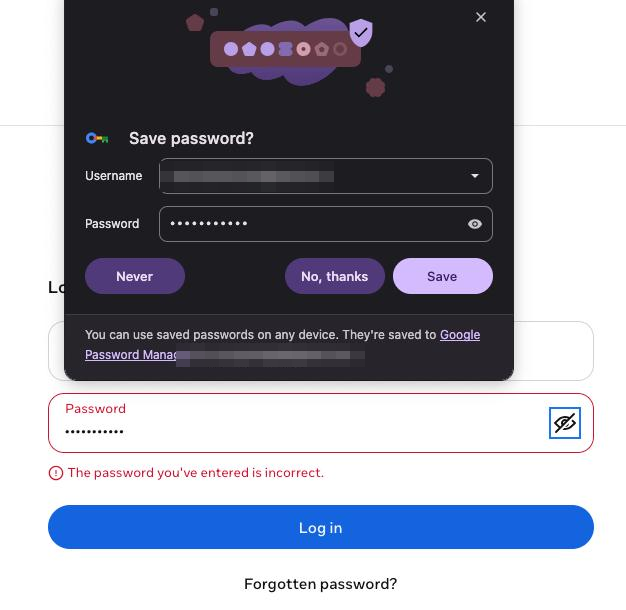
Both statements are on screen simultaneously. One of them says the credential is wrong. The other offers to keep it.
This one actually destroys data
Most paper-cuts cost seconds. This one can cost you the password.
If you hit Save — and people do, because that dialog has trained everyone to dismiss it on reflex, and Save is the highlighted button — the browser overwrites the working credential it already had with the one that was just refused. Nothing warns you. The damage shows up weeks later, when autofill confidently enters a password that doesn’t work, on a site you were certain you knew the password to, and you end up in a reset flow blaming your own memory.
That inverts the entire purpose of the feature. A password manager exists to be more reliable than you are. This is the one moment where it is guaranteed to be storing something false, and it’s also the moment it asks hardest.
The modal is in the way of the fix
Look at where the prompt sits: directly over the login form. The next thing you have to do is retype the password — and the thing blocking it is a dialog asking about the password you’re trying to replace. The interruption arrives at the exact instant it is most expensive, which is also the instant it is most certainly wrong.
Why it happens
The save prompt fires on form submission, not on successful authentication. The browser sees a password field, sees it submitted, and raises the dialog — without waiting to learn whether the far end accepted it. For a login that navigates to a new page, the browser could infer success. For a login that answers in place over XHR, it doesn’t bother to look.
The information is not hidden. The error text is in the DOM. The same login form is still on the
page, now with an error state attached — a form that has reappeared with a validation message is
about the strongest possible signal that the submission failed. And there is a formal channel for
sites to say so outright: navigator.credentials.store() has been in Chrome since 2016 and exists
precisely so a site can say this one worked, keep it.
So the browser is not missing a signal. It’s declining to wait for one.
The fix
Don’t ask on submit. Ask on success.
- If the site calls
navigator.credentials.store(), trust it. That’s the API saying so. - Otherwise, hold the prompt for a moment. If the page navigates away, offer to save. If the same login form is still sitting there — especially carrying an error — throw the prompt away.
- Never silently overwrite an existing stored password with one that has not been seen to work. An overwrite is a destructive write, and it deserves at minimum a different dialog from a first-time save.
Point 3 alone removes the data loss, and it requires no knowledge of whether the login succeeded.
The password family
This is the third case about the same thing — the password manager not using what it can plainly see:
- Case 001 — offers to save, with the username field blank, right after watching you type it.
- Case 002 — the form that throws away what you typed.
- This one — offers to save a password the page has just said is wrong.
Each is a refusal to read the screen the browser itself rendered.
Verified in Chrome with Google Password Manager (pictured). Safari/iCloud Keychain and Edge are believed to behave similarly on in-page logins, but that has not been checked and the case is tagged accordingly. Chrome does suppress the prompt in some flows, so the precise trigger conditions deserve a proper look before this is quoted as universal.
Population and frequency are estimates; only the Chrome user count, the Credential Management API and life expectancy are cited. The confident claim is the contradiction on screen: “incorrect” and “save?” in the same frame.
Difficulty to fix: easy
The page says the password is wrong. The browser rendered that sentence. It asks anyway — and if you agree, it overwrites the one that worked.
Read this case's source — _cases/033-save-password-after-failure.md