Two screens on your desk, and no way for the pointer to get from one to the other
The laptop is bottom-left, the second monitor is up and to the right. Your hand makes one diagonal flick. The pointer can't — it has to be walked up through a third display and back down, because those two screens share no edge.
Facts cited
| Office workers using two or more monitors | ~75% | arXiv natural-experiment study, 2021 |
|---|---|---|
| How the pointer crosses displays | only where two screens' pixel ranges intersect | coordinate adjacency — the same mechanism behind case 004 |
| Displays touching only at a corner | zero shared edge, zero crossings | an intersection of length 0 is not a doorway |
| Global life expectancy | 73 years | World Bank, 2023 |
Assumptions low → high
| What we can't measure | low | likely | high |
|---|---|---|---|
| People whose layout contains a diagonal pairThree or more displays, or two arranged with a vertical offset. Any staircase layout manufactures diagonal pairs — and mismatched panel sizes make the staircase the natural arrangement. | 30M | 80M | 200M |
| Diagonal crossings attempted per person per day | 4 | 8 | 20 |
| Seconds lost per doglegOvershoot, correct, re-aim. The cost is small but it lands on the fastest, least deliberate movement you make all day. | 1s | 1.5s | 3s |
Who can fix it
- Owner
- OS display / windowing teams (macOS WindowServer · Windows DWM · Linux compositors)
- Channel
- Apple Feedback Assistant · Windows Feedback Hub · mutter / wlroots issue trackers
Three displays. The big one up top, the laptop tucked below it on the left, a second monitor off to the right at mid-height. A completely ordinary desk. This one, in fact:
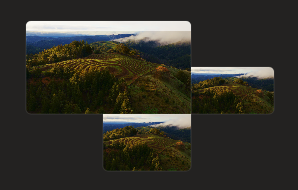
That’s a real arrangement screen, not a hypothetical. The laptop (bottom) and the right-hand monitor touch nothing but air.
You want the pointer on the right-hand monitor. Your hand makes the obvious movement: one diagonal flick, up and to the right. The pointer doesn’t go there. It can’t — those two screens do not touch anywhere, so no amount of pushing in their direction will cross the gap. The only route is up onto the big display, across it, and back down.
The vector is thrown away
A mouse movement is a vector — it has a direction, and that direction is the clearest statement of intent the input system will ever receive. Up-and-right means the screen that is up and to the right.
What the OS keeps is the crossing test: at each border, does a neighbouring display’s pixel range intersect this one’s? Direction of travel is never consulted. So the richest signal in the gesture is discarded at exactly the moment it would resolve the ambiguity, and what’s left is arithmetic on rectangles.
This is case 004 taken to its limit. There, the neighbour existed and the crossing point was too narrow. Here there is no crossing point at all — the intersection of the two screens’ edges is empty, so the pointer isn’t hitting a wall so much as discovering the room has no door.
Corners are worse than walls
Two displays meeting at a single corner is the degenerate case: the shared edge has length zero. They look adjacent on the arrangement screen — they’re literally touching — and are completely unreachable from each other.
Where three displays nearly meet, it inverts into the opposite problem: a point where a degree or two of approach angle decides which of three screens you end up on. Maximum precision demanded at the one place you’re moving fastest and least deliberately. Either way the geometry, not the gesture, is in charge.
Why the layout can’t just be fixed
The obvious retort is arrange your displays better. But the staircase isn’t a preference — it’s forced. Panels are different heights, they sit on different stands, and the arrangement is supposed to mirror where the glass actually is on your desk, because that’s what makes the crossings feel physical in the first place. Every vertical offset you introduce for accuracy’s sake manufactures another diagonal pair.
So the two goals are in direct conflict: arrange it truthfully and the pointer gets stuck; arrange it as a neat row and every crossing lies about where the screen is. No arrangement wins, which is a strong hint the arrangement isn’t where the bug lives.
The math
80M people × 8 diagonal crossings/day × 1.5s = ~150 lifetimes / year
Smaller than case 004 because it needs a diagonal pair to exist — but it grows with every display added, and multi-display desks are not getting rarer.
Per-OS specifics unverified. The arrangement editors differ in whether they permit displays to sit corner-to-corner or with a gap, and in how they snap. Whether an OS forbids the zero-length adjacency, or merely permits it and then can’t traverse it, changes the shape of the fix — worth checking on macOS, Windows and each Linux compositor before quoting any of it as behaviour.
Population and frequency are reasoned estimates, not measurements, exactly as in case 004. The confident claim is the mechanism: traversal is decided by edge intersection, and edge intersection cannot express “over there.”
The fix: nearest display in the direction of travel
When the pointer is pushed against an edge, don’t just test for an intersecting neighbour — take the motion vector and ask which display it points at. Carry the pointer to the nearest point on that display. A diagonal flick toward a screen that’s up and to the right lands on it, whether or not any pixels happen to line up.
This is the same fix as case 004, generalised from one axis to two, and it subsumes it: nearest-edge snapping is the special case where the vector happens to be vertical. One behaviour, both bugs, all three operating systems.
Worth adding alongside it: a keyboard or gesture command to send the pointer to a named display. Direction-free, unambiguous, and useful even after the geometry is fixed.
Difficulty to fix: easy
The hand drew a straight line at a screen it can see. Everything needed to honour that is already in the event — an origin, a direction, and a list of displays. Read the vector instead of intersecting rectangles.
Read this case's source — _cases/031-diagonal-display-traversal.md